Taxonomy
At a glance
Import and override the species taxonomy that AI providers and classification labels resolve against.
- Time: ~5 minutes for a standard import
- Who: admins setting up a fresh deployment, or correcting a species mapping
In v2 the Species table is sourced from the GBIF Backbone Taxonomy instead of the older Catalogue of Life (CoL) export. The stable join key is Species.taxon_id = gbifSpeciesKey — both the bundled CSVs and the AI provider category mappings pivot around it. See Taxonomy & GBIF for why this matters.
What's bundled
The Trapper Expert source ships gzipped CSV exports of the GBIF Backbone under trapper/apps/extra_tables/taxonomy/:
gbif_<class>_<rank>.csv.gzper taxonomic class (mammalia, aves, amphibia, and the three reptile orders squamata/testudines/crocodylia — GBIF has no single Reptilia class) × rank (order, family, genus, species).gbif_mammalia_overrides.csv— manual corrections layered on top of the GBIF export (e.g. recently re-classified taxa, known GBIF bugs).get_taxonomy_gbif.py— the helper script used to regenerate the bundles.
Steps
1. Import the taxonomy
The admin wizard runs this for you on a fresh deployment. To re-run later:
python manage.py import_gbif_taxonomy --taxa mammalia --mode create
python manage.py import_gbif_taxonomy --taxa mammalia aves amphibia reptilia
python manage.py import_gbif_taxonomy --taxa aves --mode update --dry-run
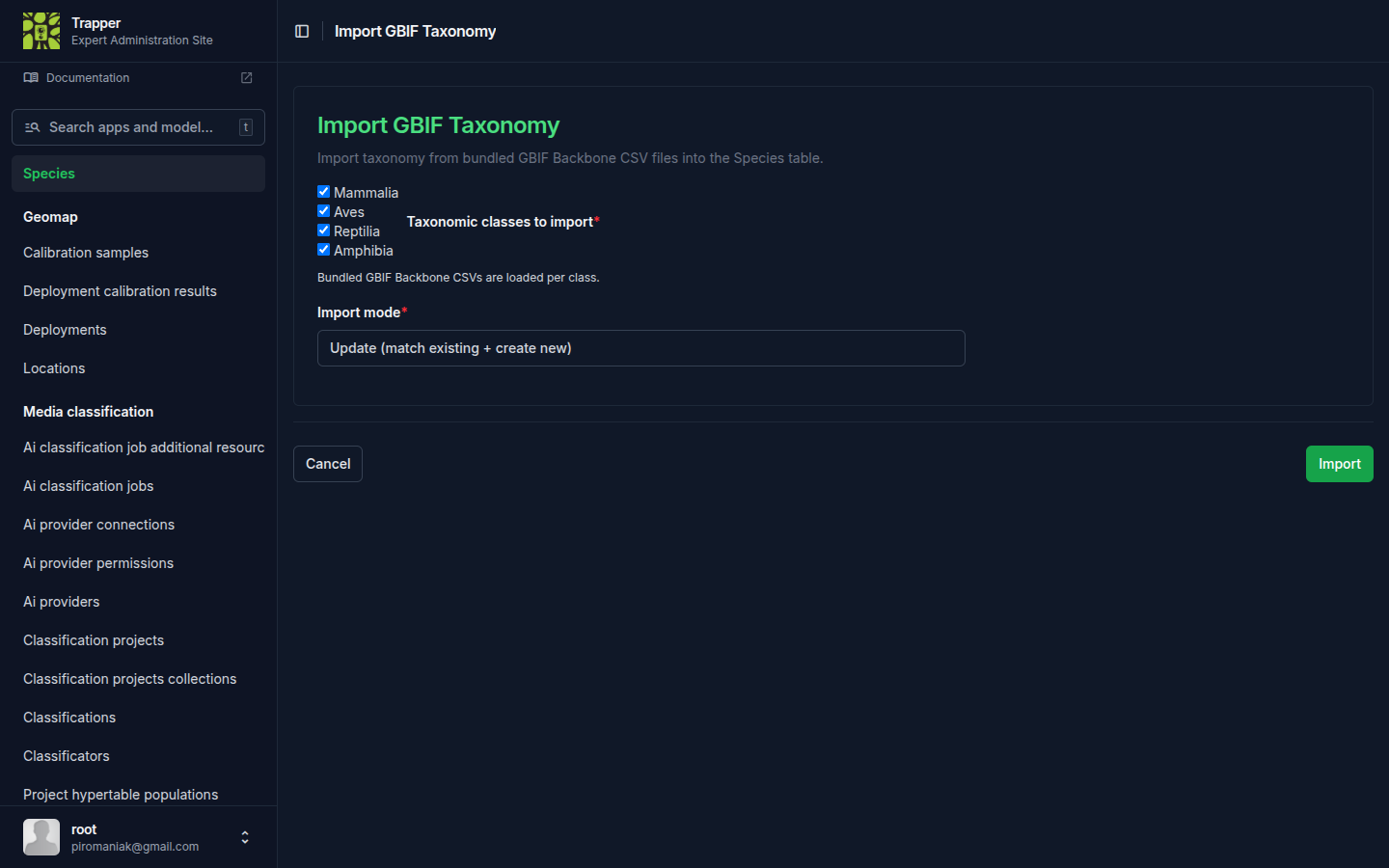
--taxa takes one or more space-separated values from mammalia/aves/reptilia/amphibia (not comma-separated) — reptilia covers all three reptile orders bundled under it.
| Mode | Effect |
|---|---|
create (default) |
Only insert species that don't already exist (matched by taxon_id) |
update |
Also overwrite name/rank/parent fields on existing rows from the bundle |
--dry-run |
Print what would happen, don't write |
The command is idempotent — running it twice does not duplicate rows.
The same flow is exposed from the admin via an Import GBIF Taxonomy button on the Species changelist (/admin/extra_tables/species/).
2. Add overrides for individual species (optional)
When the bundled GBIF export is wrong or out of date for a specific taxon, append a manual override:
python manage.py add_gbif_override mammalia "Lynx lynx,Capreolus capreolus"
The command queries the GBIF API for each name, picks the highest-confidence match, and appends the row to gbif_mammalia_overrides.csv. mammalia is currently the only taxon with an override file — the command's taxon argument only accepts values present in OVERRIDE_FILES (trapper/apps/extra_tables/gbif_utils.py), which today is just mammalia; running it with aves/reptilia/amphibia fails with an invalid-choice error. Re-run import_gbif_taxonomy afterwards with --mode update to apply the override to your DB.
Verify it worked
Check the Species changelist (/admin/extra_tables/species/) for the expected count of imported species, or query Species.objects.filter(taxon_class="Mammalia").count() in the Django shell (the stored taxon_class values are capitalized — "mammalia" matches nothing).
Why this matters for AI providers
Each AI Provider carries a categories JSON copied from trapper-schemas in Camtrap-DP format. Each species AttributeLabel in that JSON has a gbifSpeciesKey. The sync_ai_models command (run automatically by the admin wizard) resolves each label to a local Species row — first by gbifSpeciesKey against Species.taxon_id, falling back to a case-insensitive match on scientificName against Species.latin_name, and creating a new Species row if neither matches — then writes the resulting PK as speciesId in the same JSON. This is how AI predictions get linked to local Species rows; a label that matches by name but not GBIF key (e.g. taxonomy not yet imported) still resolves, but the new/matched row may be missing the GBIF-sourced taxonomic fields (order/family/genus) until the next taxonomy import backfills it.
Warning
Don't hand-edit speciesId — it's computed by sync_ai_models.