Configure trackers
At a glance
Choose which tracker turns frame-by-frame detections into multi-frame tracks for video resources.
- Time: ~5 minutes
- Who: project admins tuning AI pipeline behaviour for video collections
- Prerequisites: an AI provider connection and a detection-type AI model already configured — see Configure an AI Manager connection
For video resources, a tracker turns frame-by-frame detections into multi-frame DetectedObject tracks. The Expert doesn't run the tracker itself — it ships in trapper-ai-worker packages (trapperai-trackers plus the optional trapperai-trackers-ultralytics and trapperai-trackers-boxmot runtimes). Expert configures which tracker to use via tracker, a field on CommonJobConfig (trapper_schemas.jobs.common) — not on the AI Manager's PredictionModel.model_config (that's where it lived before a refactor moved it; its docstring is explicit: "Runtime concern that lives at the job level... the model registry only knows about the model itself and the runtime tracker is a per-job decision").
noop/majority_voting aren't user-selectable
The table below reflects what's actually implemented in trapper-ai-worker (branch v2, packages/trackers*). TrackerConfig.type is a plain optional string (no fixed choices at the schema level), but in the worker code (resource_processor.py) noop/majority_voting are chosen automatically by context — depth jobs, single images, and re-processing of existing objects always get them; only genuine video tracking goes through the configurable factory below.
Available trackers
| Tracker type string | Package | When it's used |
|---|---|---|
noop |
trapperai-trackers (built in) |
No tracking; each detection is its own track. Used automatically for depth jobs and single images — likely not a free user choice for video. |
majority_voting |
trapperai-trackers (built in) |
Consensus across frames when re-processing a resource that already has tracked objects. Also worker-internal. |
oks |
trapperai-trackers (built in) |
Keypoint/pose-anchored tracking. |
botsort / botsort_ultralytics (worker default for video) |
trapperai-trackers-ultralytics |
Ultralytics' own BoT-SORT, with optional ReID (reid_backend: yolo_embed\|dino). |
bytetrack / bytetrack_ultralytics |
trapperai-trackers-ultralytics |
Ultralytics' own ByteTrack. |
boxmot:<name> (e.g. boxmot:botsort, boxmot:bytetrack) |
trapperai-trackers-boxmot |
Same algorithm families via the BoxMOT library instead of Ultralytics' native code — different tuning knobs/dependencies. |
sam3_batch |
trapperai-trackers-ultralytics |
Ultralytics SAM3 video-segmentation-based batch tracking. |
Before you begin
- An AI provider connection and a detection-type AI model are already configured (see Configure an AI Manager connection)
- You have admin access to the Expert backend
Steps
1. Open the Classification Project's prediction job configuration
On the Classification Project's edit page, expand the Prediction Job Configuration section and open the Detection job type — this is prediction_config.detection, shaped {common: {...}, spec: {...}} (see Create a classification project).
2. Set the tracker
Under common, set tracker.type to the tracker string you want (see the table above), plus any of min_confirmations, tracklet_linker, or track_filter it supports. This is validated against trapper-schemas' CommonJobConfig on save.
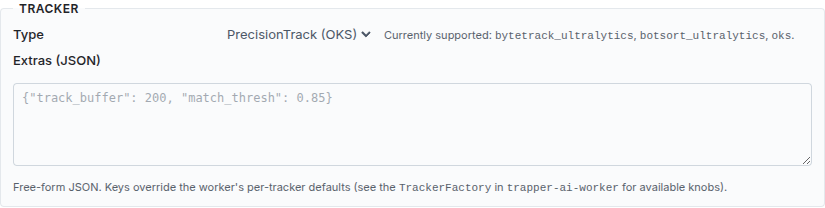
The form dropdown is a subset of what the worker accepts
The Tracker type dropdown in the Detection panel offers only ByteTrack (bytetrack_ultralytics), BoT-SORT (botsort_ultralytics), and PrecisionTrack (OKS) (oks). The other factory-supported strings — boxmot:<name>, sam3_batch — are valid for the worker but have no dropdown entry; set them by editing the project's prediction_config JSON directly (or a single job's job_config).
3. Re-run affected jobs (optional)
For a one-off override of a single AIClassificationJob without changing the project default, edit that job's job_config before re-submitting — typically via Run & re-run the AI pipeline.
Verify it worked
Re-run the AI pipeline on a video collection and inspect the resulting tracks — the factory-backed trackers (botsort/bytetrack/boxmot:*) should produce stable per-animal track IDs across frames; noop shows one track per detection.
Troubleshooting
ImportError mentioning a tracker package at runtime
The worker's TrackerFactory raises this when the matching runtime package isn't installed on that coordinator — e.g. botsort/bytetrack need trapperai-trackers-ultralytics, boxmot:* needs trapperai-trackers-boxmot. Install the missing runtime alongside the coordinator (see AI pipeline architecture).
Reference
Schema reference: trapper_schemas.jobs.specs and the predictor/tracker classes in trapper_schemas.predictors. Worker-side implementations live under trapper-ai-worker/packages/trackers/, packages/trackers-ultralytics/, and packages/trackers-boxmot/; selection logic in packages/worker/src/trapperai_worker/resource_processor.py.