Camtrap DP export
At a glance
Export a Classification Project's results as a Camtrap DP package, optionally with privacy redaction, then publish it to Dataverse or Zenodo.
- Time: ~10 minutes for a standard export
- Who: project owners/managers publishing or sharing results
- Prerequisites: a Classification Project with approved classifications
TRAPPER ships with a built-in exporter that produces Camera Trap Data Package (Camtrap DP) archives from a Classification Project — the community-developed TDWG-endorsed exchange format for camera trap data. A package is a Frictionless Data Package containing three required tabular resources (deployments, media, observations) plus a datapackage.json descriptor.
Trapper's ResultsDataPackageGenerator uses the camtrap-package Python library and frictionless[parquet] under the hood. Output archives are valid Camtrap DP packages, consumable by any tool that understands the standard (camtraptor in R, camtrap-dp.py, GBIF, …).
What gets exported
<package-name>.zip
├── datapackage.json        Frictionless descriptor + Camtrap DP metadata
├── deployments.csv.gz      One row per Deployment (or .parquet)
├── media.csv.gz            One row per Resource (or .parquet)
└── observations.csv.gz     One row per ClassificationDynamicAttrs
                            (or per event when aggregation is on; or .parquet)
The exporter pulls data from the live database via polars, hands it to CamTrapPackage for schema-aligned serialization, and writes the ZIP. CSV+gzip is the default; Parquet is offered for analytic workloads.
Each generated archive is recorded in the UserDataPackage model (/admin/accounts/userdatapackage/):
| Field | Meaning |
|---|---|
user |
Generator/owner |
project |
The source ClassificationProject |
package (file) |
The ZIP archive — user's media area, or cloud storage |
package_type |
C = CLASSIFICATION_RESULTS (released/public), X = CLASSIFICATION_RESULTS_CACHE (cached working copy), M = MEDIA_FILES (legacy) |
released |
True for the canonical publishable copy, False for working/cached generations |
cache_key |
MD5 hash of the export parameters — short-circuits re-runs with identical params |
uuid4 |
Token for shareable download URLs (?rt=<uuid4>) without granting an account |
date_created |
When the run finished |
Every export run writes a cache (X) package; a subsequent run with the same cache_key returns the cached package without regenerating. Ticking Release marks the result as released (C) — canonical, excluded from cache invalidation, shown to project members on the project page.
Steps
1. Open the export form
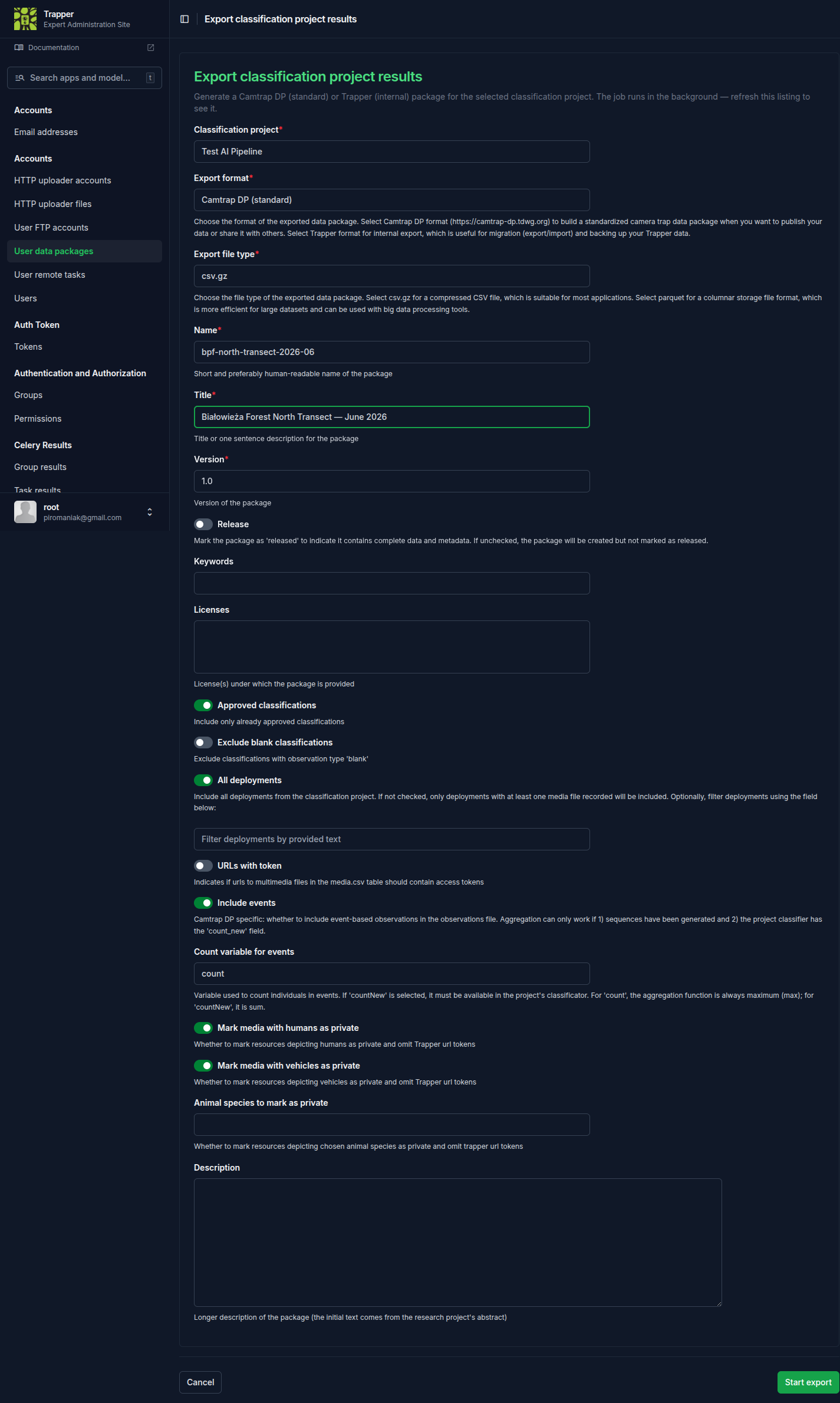
There is no export button on the Classification Project's own pages. Go to Expert admin's
Accounts → User data packages (/admin/accounts/userdatapackage/) and use the
Export classification project results action in the list header
(/admin/accounts/userdatapackage/export-classification-results/).
2. Set the package metadata
| Field | What it does | Recommended value |
|---|---|---|
| Name | Slug-safe identifier (regex ^([-a-z0-9._/])+$) |
e.g. bialowieza-2025-summer |
| Title | Human-readable | e.g. "Białowieża 2025 summer camera-trap data" |
| Version | Semver string | 1.0 for a first release |
| Keywords | Free-form tags | — |
| Licenses | From the Licence registry | Pick one explicitly — unset defaults to a private licence on data/media scopes |
3. Choose the format
- Export format —
camtrapdp(recommended) ortrapper(internal, round-trip imports only). - File type —
csv.gz(universal, default) orparquet(smaller, faster for analytics; consumer needsfrictionless[parquet]).
4. Configure filtering
| Field | What it does |
|---|---|
| Approved only | Include only Classifications with is_approved=True. Default True; turn off only for archival exports of in-progress work |
| Exclude blank | Drop observation_type=blank rows |
| All deployments | When off, only deployments with at least one matching observation are exported |
| Filter deployments | Substring match against Deployment.deployment_id — e.g. "give me one camera's data" |
5. Configure events (Camtrap-DP aggregation)
- Include events — aggregate observations into event-level rows (one row per ecological event rather than per-frame detection).
- Count variable —
count(raw count per observation) orcountNew(newly seen individuals only, for individual-identification projects).
6. Configure privacy / redaction
| Field | What it does |
|---|---|
| Mark media with humans as private | Strips media URLs and bounding boxes for resources where AI/annotators detected a human |
| Mark media with vehicles as private | Same, for vehicles |
| Private species | Multi-select of Species whose locations should be redacted (e.g. sensitive predator dens) — observations stay, locations are coarsened |
| URLs with token | Sign media URLs with a download token so external readers without Trapper accounts can access referenced files |
7. Release and submit
Tick Release to mark the resulting archive as the canonical publishable copy; leave it unticked for working/cached exports. Submit — the export runs as a Celery task (celery_results_to_data_package). Watch the Data packages panel of your dashboard (/dashboard/) for the row to appear, then download with the icon in the Actions column.
Re-running with the same parameters is free
Generated archives obey the cache — re-submitting the form with identical parameters returns the cached package immediately. To force a fresh generation, change any parameter (e.g. bump the version) or tick Clear cache if available.
Publishing to external data hubs
Once you have a released package, push it to a public data hub. Two backends are supported out of the box: Dataverse (open-source, used by Harvard, GBIF nodes, many institutions) and Zenodo (CERN-hosted).
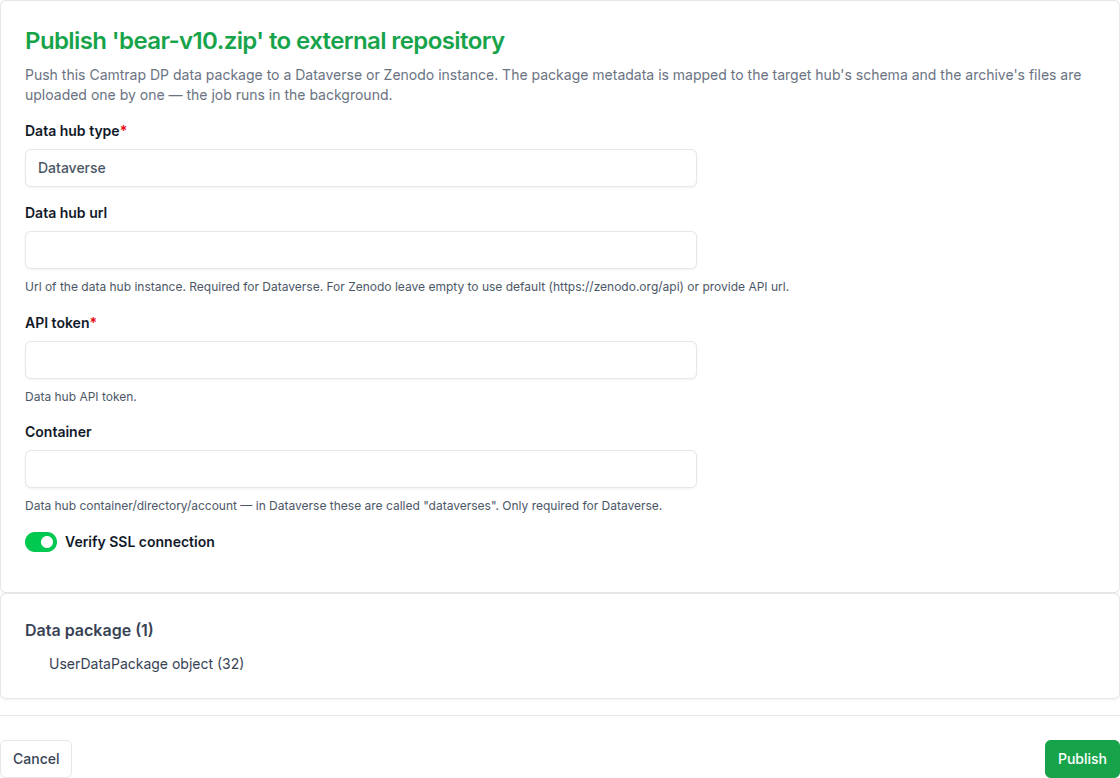
The form lives at Dashboard → Data packages → Publish data package:
- Pick the source
UserDataPackage(must bereleased=True). - Choose Data hub: Dataverse or Zenodo.
- Fill in connection details: Host URL (e.g.
https://dataverse.example.eduorhttps://zenodo.org), API token (from the hub's user profile), Container (Dataverse only — the target dataset/collection ID), Secure connection (leave on unless the hub uses self-signed TLS internally). - Submit. The Celery task
celery_publish_data_packageparsesdatapackage.json, maps it viacamtrap_package.mapper.package2dataverse/package2zenodo, and uploads files + metadata via the hub's REST API. On success, the dashboard shows the public URL.
The same form is available to admins as the Publish to external repository action on a package's admin detail page (/admin/accounts/userdatapackage/<id>/) — only classification-results packages can be published:
Caveats
- Tokens are stored in the form submission only, not the database. Publishing fails if the token lacks write access.
- For Dataverse, the target dataset must already exist and be in draft state — you publish the draft from the Dataverse UI afterward.
- Zenodo creates immutable DOIs — be sure of the package contents before publishing.
Managing existing packages
User dashboard (/dashboard/) — Data packages panel lists the current user's released and working packages (filename, type, size, created, download, delete). Cached packages are hidden.
Admin view (/admin/accounts/userdatapackage/) — read-only listing for site admins, filterable by package_type, project, user, released. Useful for auditing disk usage per user or which projects have released packages.
Public sharing without an account
The download URL /data-package/<pk>/ accepts a ?rt=<uuid4> query token equal to the package's uuid4 field — anyone with the token-bearing URL can download without logging in. Use the Get download URL dashboard action to copy one. Untokened URLs require the package owner or a superuser; everyone else gets 404.
REST API
Generate / fetch a package
GET /media_classification/api/package/{project_pk}/ — standard DRF authentication (Session, OAuth2, or token). The requesting user needs can_view_classifications on the target Classification Project.
Query parameters mirror the export form's ResultsDataPackageGeneratorParams:
| Parameter | Effect | Default |
|---|---|---|
export_format |
camtrapdp / trapper |
camtrapdp |
export_filetype |
csv.gz / parquet |
csv.gz |
approved_only |
true / false |
true |
exclude_blank |
true / false |
false |
all_deployments |
true / false |
true |
filter_deployments |
substring of deployment_id |
(empty) |
include_events |
true / false |
false |
events_count_var |
count / countNew |
count |
private_human |
true / false |
true |
private_vehicle |
true / false |
true |
private_species |
comma-separated Species PKs | (empty) |
trapper_url_token |
sign media URLs | true |
release |
mark generated package released | false |
clear_cache |
bypass cached package match | false |
get_released |
return latest released package, skip generation | false |
name, version, title, description, keywords, licenses |
package metadata | various |
Response shape:
{
  "data": {
    "message": "Package successfully generated and saved to cache. Set clear_cache=True to rebuild it.",
    "errors": null,
    "package": "https://trapper.example.org/data-package/12345/?rt=8e5d…"
  }
}
package is a token-bearing download link, usable directly without re-authenticating. When the cache short-circuited generation, message reads "Package available in the cache. Set clear_cache=True to rebuild it." instead.
private_species does not work via query string
The query-parameter parser currently doesn't split private_species into a list of PKs — the raw string reaches the generator and the filter is not applied correctly (known backend bug). Until it's fixed, set private species via the export form in the web UI, where the field works as expected.
Example: programmatic export
# 1. Authenticate (token authentication shown; session and OAuth2 also work).
#    There is no token-obtain endpoint — generate a DRF token by hand in the
#    Expert admin: Edit profile → API token (DRF) → Generate API token
#    (see reference/rest-api.md), then paste it here.
TOKEN="paste-your-DRF-token-here"

# 2. Generate (or reuse cache) a Camtrap DP export of project 7 in Parquet,
#    with humans + vehicles redacted, no events:
curl -s -G "https://trapper.example.org/media_classification/api/package/7/" \
  -H "Authorization: Token $TOKEN" \
  --data-urlencode "export_format=camtrapdp" \
  --data-urlencode "export_filetype=parquet" \
  --data-urlencode "approved_only=true" \
  --data-urlencode "include_events=false" \
  --data-urlencode "private_human=true" \
  --data-urlencode "private_vehicle=true" \
  --data-urlencode "name=bialowieza-2025-summer" \
  --data-urlencode "version=1.0" \
  --data-urlencode "title=Białowieża 2025 summer"

# 3. Pull the URL out and download:
URL="$(curl -s -G "https://trapper.example.org/media_classification/api/package/7/" \
         -H "Authorization: Token $TOKEN" | jq -r .data.package)"
curl -OJL "$URL"
Example: fetch the latest released package only
curl -s -G "https://trapper.example.org/media_classification/api/package/7/" \
  -H "Authorization: Token $TOKEN" \
  --data-urlencode "get_released=true" \
  | jq -r .data.package \
  | xargs curl -OJL
Returns 404 if the project has no released packages yet.
Example: Python
import requests

BASE = "https://trapper.example.org"
TOKEN = "..."

resp = requests.get(
    f"{BASE}/media_classification/api/package/7/",
    headers={"Authorization": f"Token {TOKEN}"},
    params={
        "export_format": "camtrapdp",
        "export_filetype": "csv.gz",
        "approved_only": "true",
        "private_human": "true",
        "name": "bialowieza-2025-summer",
        "version": "1.0",
        "title": "Białowieża 2025 summer",
    },
    timeout=600,    # generation can be slow on large projects
)
resp.raise_for_status()
download_url = resp.json()["data"]["package"]

archive = requests.get(download_url, stream=True)
archive.raise_for_status()
with open("package.zip", "wb") as fh:
    for chunk in archive.iter_content(chunk_size=2**20):
        fh.write(chunk)
The same flow works from R via httr2, or any other HTTP client. For analytic workflows, point camtraptor (R) or camtrap-dp.py at the downloaded archive directly — they understand the Camtrap DP format and abstract away the deployments/media/observations joins.
See also
- Create a classification project — AI configuration that feeds the observations exported here
- Register & sync AI providers — the
categoriesJSON shares label semantics with exported observations - Camtrap DP — the standard itself