Video annotation & interpolation
At a glance
The Citizen Science frontend's expert-mode video annotation panel adds a per-frame timeline, piecewise-linear bounding-box interpolation, occurrence-aware track navigation, and bulk delete/merge actions on top of the standard single-bbox annotation flow.
- Who: expert annotators working on video classifications
- Prerequisites: a video resource open in the classification interface
Grounded in frontend source
This page is grounded in the live frontend source — chiefly classification-hotkeys.service.ts and resource-annotator.component.ts — so it stays correct only as long as those files don't change underneath it. The in-app cheat sheet (meta+/) always reflects the current build; if anything here disagrees with that dialog, trust the dialog.
Modifier-key convention
The shortcut tables use meta for the platform-aware modifier classification-hotkeys.service.ts resolves at runtime:
meta= Cmd on macOS.meta= Ctrl on Windows/Linux.
A binding written meta+i means Cmd+I on a Mac, Ctrl+I elsewhere. Where Shift/Alt are involved, the order is meta+shift+... / meta+alt+... — actual key-press order doesn't matter.
Two scopes
- VIDEO scope — only active when a video classification is open: frame transport, keyframe management, interpolation, occurrence navigation, merge.
- BASE scope — always active in both video and image classifications: bbox selection, classification/sequence navigation, save, in-app shortcut help.
Both scopes are active together during video annotation, so a video user has every binding below available.
What "object" means here
The frontend uses object for what the AI worker calls a detected object (a multi-frame track of one individual). An object has a sparse bboxes array indexed by frame number — most entries null (no observation on that frame), some filled with [x, y, w, h]. A contiguous run of non-null entries is an occurrence: the animal entered the frame, did something, and exited.
A single tracked individual can have multiple occurrences — e.g. an animal that walks behind a tree and re-emerges produces two non-null runs with a null gap between them.
How interpolation works
Interpolation is explicit, never automatic — the frontend only fills bboxes when you press one of the two interpolation hotkeys.
The math is linear independently on x, y, w, h (the interpolateBbox() helper in resource-annotator.component.ts). The fill algorithm (fillInterpolatedBboxes() in the same file) is piecewise: it collects every existing non-null bbox in the active range as a knot, then interpolates only the null slots strictly between consecutive knot pairs. Existing bboxes are preserved — never overwritten — even if they sit between two knots that would otherwise imply a different value.
Concretely, if the selected object's bboxes array looks like:
frame:  0   1    2   3   4   5    6    7    8   9   10
bbox:  K0   .    .   .   .  Km    .    .    .   .   K1
                             ^                        ^
                             └─ existing intermediate knot
                                                      └─ keyframe
                                                         (or current
                                                          frame)
…and you trigger meta+i with the keyframe at frame 0 and the current frame at frame 10, the algorithm:
- Collects the three knots
K0(frame 0),Km(frame 5),K1(frame 10). - Linearly fills frames 1-4 between
K0andKm. - Linearly fills frames 6-9 between
KmandK1. - Leaves
Kmitself untouched.
This is what the source comment in fillInterpolatedBboxes() describes: "collect every existing bbox [in range] as a knot, then lerp the strictly-interior frames between each consecutive knot pair. Existing intermediate bboxes are PRESERVED; only null slots get filled." Adding a manually-edited bbox in the middle of a previously-interpolated run is therefore how you correct interpolation drift: the new bbox becomes a knot, and re-running interpolation re-shapes the adjacent segments around it. There's no separate "promote to keyframe" gesture — any non-null entry is a knot.
Validation:
- The frame range must be at least 2 frames wide, otherwise the toast "No frames to interpolate" appears.
- Both endpoints of the range (the keyframe and the current frame) must carry a bbox, and at least two knots must exist in the range. Error toast: "Need a bbox at both the keyframe and the current frame".
- If every frame in range already has a bbox there is nothing to fill: "All frames in range already have a bbox" (info, not an error).
Two flavours of interpolation
| Hotkey | Name | Fills between |
|---|---|---|
meta+i |
Interpolate since keyframe | The most recent keyframe (marked with meta+k) and the current frame. Use after marking the start of a clean run and scrubbing to its end. |
meta+shift+i |
Interpolate since previous occurrence | The end of the previous occurrence of the same object and the current frame. Use when the object reappears after a gap and you want to bridge the two runs. |
The keyframe is a separate marker from the bboxes themselves, toggled by meta+k: pressing on an unmarked frame sets it; pressing on the already-marked keyframe clears it. meta+shift+k always clears, regardless of state.
Occurrence-aware navigation
Four navigation actions move the playhead relative to the selected object's runs of non-null bboxes (goToFirstFrameOfObject(), goToPreviousOccurence(), goToNextOccurence(), goToKeyFrame() in resource-annotator.component.ts). All four require exactly one object selected — zero or more than one is an error.
| Hotkey | Action |
|---|---|
meta+shift+g |
First frame of object — jumps to the first frame anywhere in the timeline where the selected object has a non-null bbox (object.bboxes.findIndex(b => b !== null)). |
meta+h |
Previous occurrence — jumps to the end of the previous run (the last frame before the current run's start gap). If there's no preceding run, falls back to the start of the current run. |
meta+j |
Next occurrence — mirror of the above: jumps to the start of the next run, or the end of the current run if there is none. |
meta+l |
Go to keyframe — jumps to the frame set as the keyframe via meta+k. No-op if none is set. |
The "occurrence"/"run" model (the isRunStart/isRunEnd helpers in resource-annotator.component.ts):
isRunStart(bboxes, f) = bboxes[f] != null && (f === 0 || bboxes[f - 1] == null)
isRunEnd(bboxes, f)   = bboxes[f] != null && (f === bboxes.length - 1 || bboxes[f + 1] == null)
Frame transport, save, selection
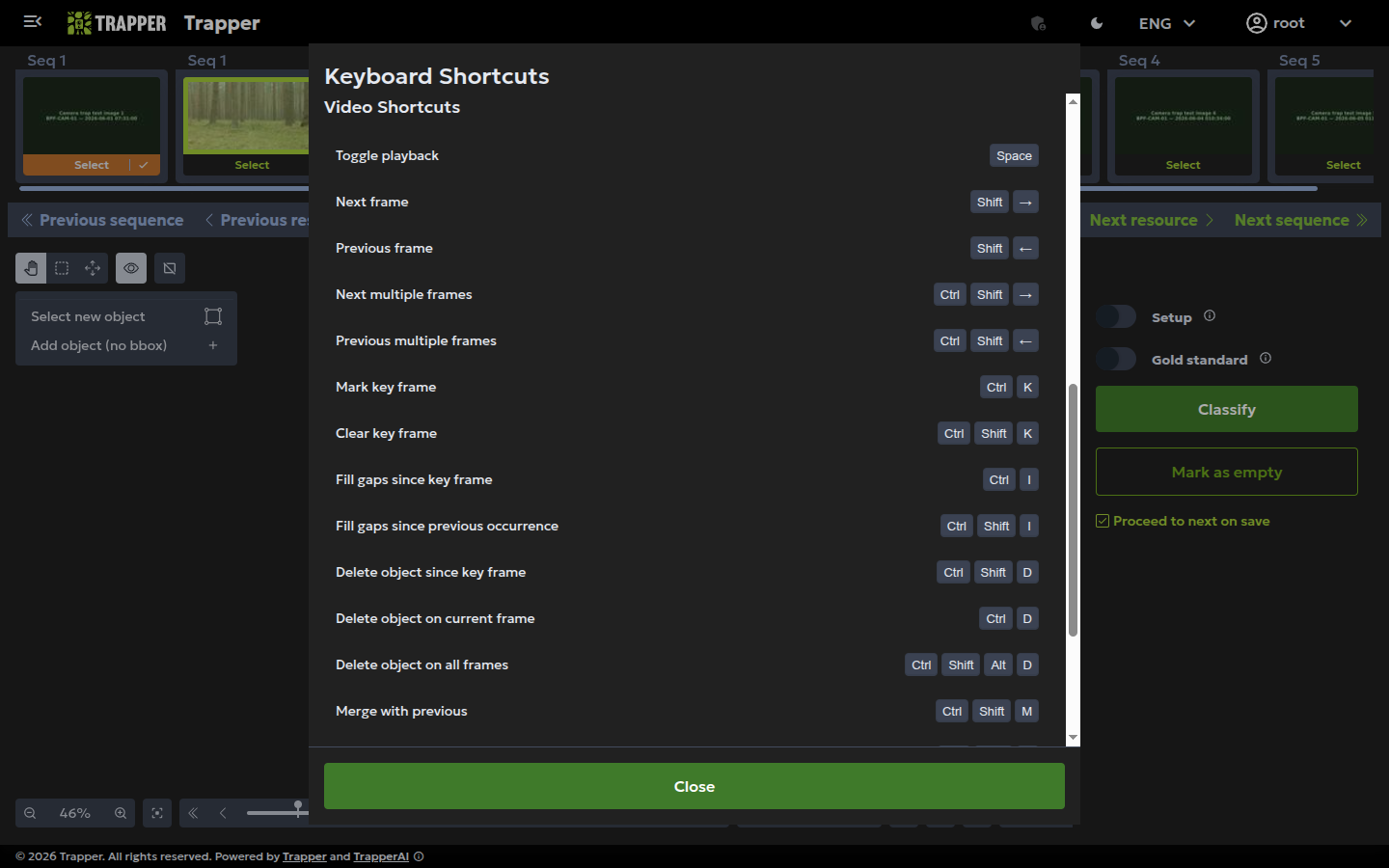
| Shortcut | Action |
|---|---|
space |
Toggle video playback (play/pause) |
shift+right / shift+left |
Step forward/back one frame |
meta+shift+right / meta+shift+left |
Step forward/back ten frames |
right / left |
Next/previous classification (different object on the same media, or next media if the queue advances) |
meta+right / meta+left |
Next/previous sequence |
meta+down / meta+up |
Select next/previous bbox on the current frame |
meta+a |
Select all bboxes |
meta+shift+a |
Select the entire current sequence |
meta+alt+d |
Deselect bboxes |
escape |
Deselect (or cancel current edit) |
meta+escape |
Clear sequence selection |
meta+s |
Save the classification |
meta+shift+down |
Move keyboard focus into the first form field of the attributes panel |
Track lifecycle: keyframes, deletion, merge
| Shortcut | Action |
|---|---|
meta+k |
Toggle keyframe at the current frame |
meta+shift+k |
Clear keyframe (idempotent) |
meta+i |
Interpolate from keyframe to current frame |
meta+shift+i |
Interpolate from previous occurrence's end to current frame |
meta+d |
Delete this object's bbox on the current frame only |
meta+shift+d |
Delete this object's bboxes from the keyframe forward |
meta+shift+alt+d |
Delete the object's entire bbox track (every frame) |
meta+shift+m |
Open the merge modal — pick a different object whose track this one should be appended onto. The selected object's bboxes from the current frame onward are copied into the chosen previous object, then the selected object is deleted (mergeObjects() in resource-annotator.component.ts) |
meta+shift+s |
Split at current frame — the inverse of merge: treat the rest of this object's track from the current frame onward as a new individual. |
In-app help
meta+/ opens the Hotkeys dialog, auto-rendered from classification-hotkeys.service.ts for the current build.
What happens to your edits
When you press meta+s (or autosave triggers), the frontend:
- Walks every object's full
bboxesarray — every non-null entry, whether placed manually, from the AI tracker, or filled by a prior interpolation run — and emits one row per non-null frame. - Encodes the rows into the
AggregateFramesPayloadmsgpack format (see Frame timeseries), zstd-compresses, and uploads the blob with the rest of the classification payload (saveClassification()inclassification-view.component.ts).
Two consequences:
- Interpolation is materialised before save. The backend never re-interpolates — whatever shape your timeline has when you press save is the shape stored. Re-running interpolation later requires editing in the frontend again.
- No per-frame attribute overrides. Attribute values (species, sex, age, behaviour, …) are stored once per object, not per frame — there's no per-frame attribute editing surface. Per-frame AI metrics (confidence, distance) are read-only, sourced from the AI pipeline.
Troubleshooting
Edits don't show up in analytics queries
Check: the Celery worker is running (./profiles/<profile>/logs.sh trapper-celery); that the project's hypertable snapshot has actually been populated at least once (Media classification → Project hypertable populations — status should be non-empty, not stuck PENDING; trigger/re-run it with python manage.py populate_project_hypertable --project <id>); and Flower at http://localhost:5555 for a stuck queue. There's no per-deployment .env toggle for this — the hypertable itself always exists, but each project's snapshot is only as fresh as its last population run.
Next steps
- Frame timeseries — the storage architecture behind these edits
- Configure trackers