Configure an AI Manager connection
At a glance
Point the Expert backend at an AI Manager instance so AI Providers can submit jobs to it. The admin wizard does this automatically on a fresh deployment — use this page when you need a second connection, or are bootstrapping manually.
- Time: ~5 minutes
- Who: admins wiring up a non-default AI Manager, or troubleshooting an existing connection
- Prerequisites: a reachable AI Manager instance with credentials for an AI Worker user
Before you begin
- AI Manager instance is up and reachable from the Expert backend
- You have (or can create) an AI Worker user on the AI Manager
You only need this manual flow when:
- You added a brand-new model to
trapper-schemasand want to wire it up before the next release. - You're testing an external/experimental model not in the schemas catalog.
- You want to point at a second AI Manager instance (e.g. a GPU box on a different network).
Steps
1. Create the connection
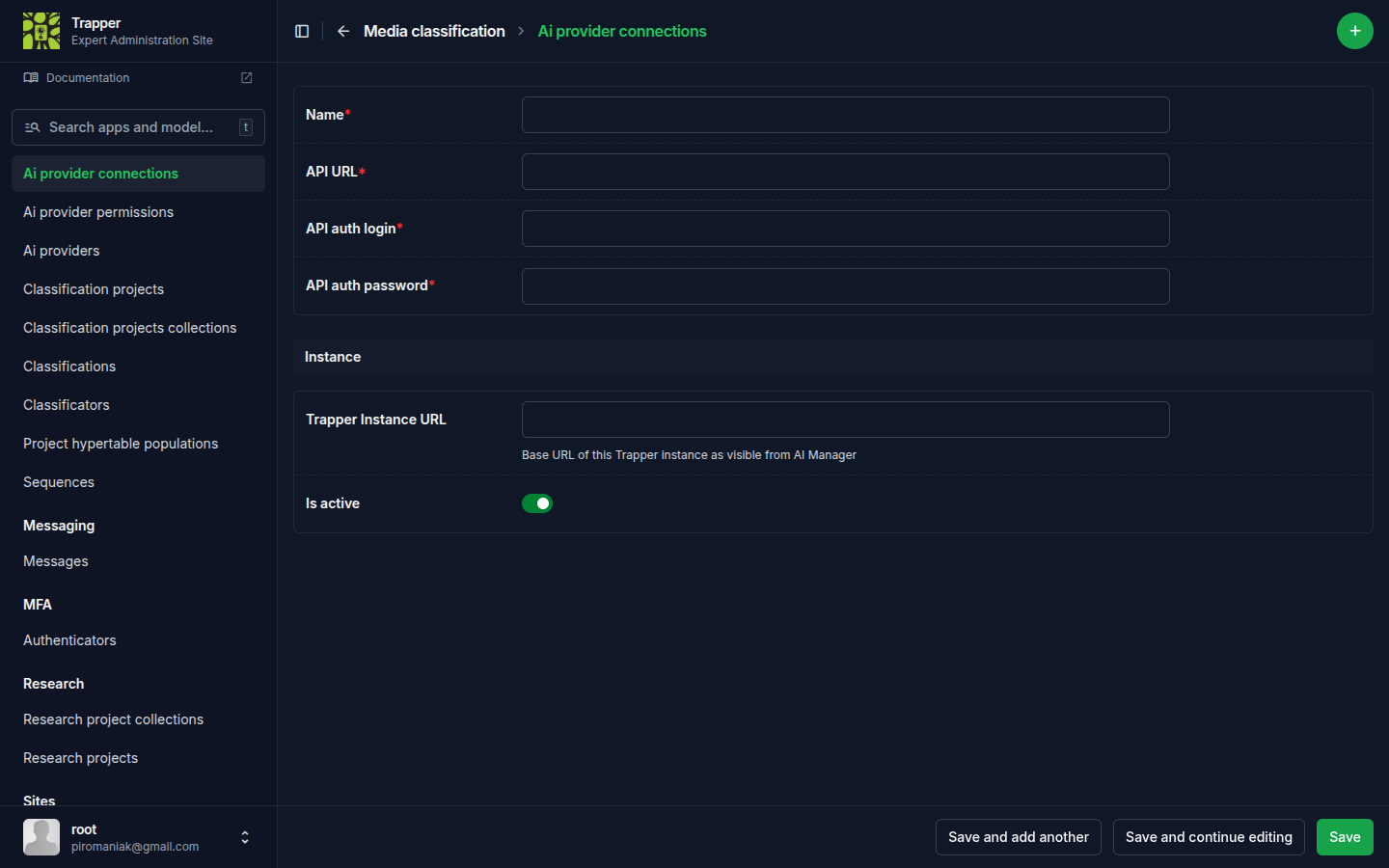
In the Expert admin: Media classification → Ai provider connections, then the + icon.
| Field | What it does |
|---|---|
| Name | Identify the connection |
| API URL | Base URL of your AI Manager, e.g. https://ai.example.com |
| API auth login / API auth password | Credentials of the AI Worker user on the AI Manager |
| Trapper Instance URL | Base URL of this Expert instance — used for callback URLs sent to the AI Manager |
| Is active | Check it |
2. Register the model on the AI Manager
If the model lives in trapper-schemas:
./admin.py manage trapper-ai-web sync_models_from_schemas -p <profile>
Otherwise, create the PredictionModel row by hand in the AI Manager admin: upload the weights file, set predictor_class to one of the registered classes (see trapper-ai-worker's docs), set model_file_hash to the SHA-256 of the weights, and toggle is_active=True.
3. Pull the catalog into the Expert
./admin.py manage trapper sync_ai_models -p <profile>
Pulls the AI Manager's PredictionModel list, creates/updates AIProvider rows (matched by model_file_hash), copies the bundled trapper-schemas categories JSON onto each provider, and resolves gbifSpeciesKey → Species.taxon_id.
If the model is not in trapper-schemas, hand-author the categories JSON in the Expert admin — see Register & sync AI providers for the format.
4. Smoke-test
- Upload a small batch of test images to a collection wired into a
ClassificationProjectpointing at the new provider. - Watch the AI Classification Job row appear and progress through stages.
- Open one of the resources in the classify view and verify AI Classifications + bounding boxes.
- If parsing failed, use Reparse results to fix the
categoriesJSON and re-ingest without re-running inference.
Verify it worked
The new AIProviderConnection should show recent successful job submissions, and AIProvider rows pointing at it should have is_active=True and a populated categories JSON.
Troubleshooting
sync_ai_models runs but no new AIProvider rows appear
Check that the PredictionModel on the AI Manager has is_active=True and a model_file_hash set — inactive or hash-less models are skipped during sync.
Connection test fails / jobs never submit
Check the connection is reachable from inside the Expert container, not just from your browser (./profiles/<profile>/exec.sh trapper curl <API URL>), and that the Trapper Instance URL is reachable from the AI Manager side too — callbacks fail silently if it points at localhost from inside a container.